Learning Takes a Village

Build Something Real With AI.

Go from an idea to a working application with hands-on AI coding education. No coding experience required.

  • 4 live one-hour sessions
  • From $99 for the full course
  • Up to 5 students per group
  • Beginner friendly
Illustration of the kind of conversation you’ll practice. Not a real student project.

Flagship course

Vibe Coding 101

Four live one-hour sessions that teach you to direct AI tools to build a real project, even if you’ve never written code.

  • Prompting fundamentals and AI coding tools setup
  • Direct AI to build your project
  • Debugging and deployment fundamentals
Groupper person · full course$99
Privateper person · full course$199

Four hours in total. AI subscriptions, API credits, hosting and domains are extra.

Our products

Meet What We’ve Built

Real products. Real problems. Built with AI.

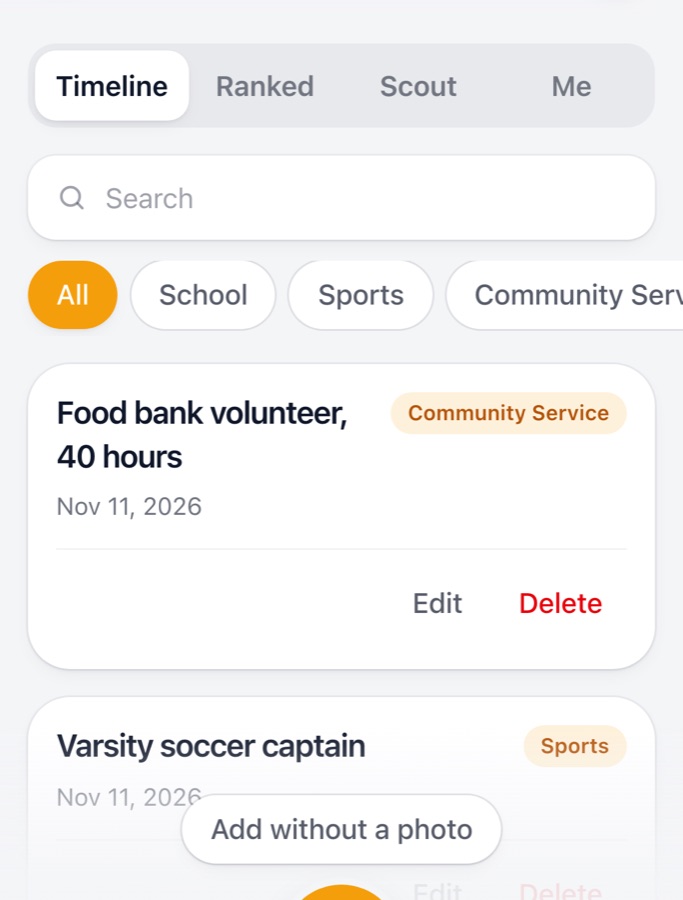
Screenshot of the Trophy Case timeline showing three saved achievements
Live Product

Trophy Case

Your achievements deserve more than a drawer.

Capture accomplishments, track your progress, and get AI-powered guidance toward your next big goal.

Installable web app (PWA) for phones. Not an App Store app.

EcoPrompt extension icon
  • Dashboard
  • Prompt Optimizer
  • Energy history
Live Product

EcoPrompt

See what your browsing and AI prompts may cost the planet.

A free Chrome extension that estimates the energy used by the pages you visit and your AI prompts, and helps you write more efficient prompts.

Chrome extension. Energy figures are estimates, not measurements.

How it works

From idea to something you can show.

  1. Tell us your idea

    Send an enrollment inquiry. Pick group or private and tell us what you’d like to build. A rough idea is plenty.

  2. We confirm the details

    We email you to agree on times and share payment details. Nothing is charged through the website.

  3. Build in four live sessions

    Learn to prompt, set up your tools, direct AI to build, then debug and deploy.

Curriculum preview

Four sessions. Four hours.

Each session is one live hour and builds on the last.

  1. Session1

    Prompting Fundamentals

    How to describe what you want so an AI assistant gives you useful results: clear goals, context, and follow-up questions.

    1 hour · live

  2. Session2

    AI Coding Tools Setup

    Install and configure an AI coding environment, such as Claude, Cursor or VS Code with an AI assistant, and learn to steer it.

    1 hour · live

  3. Session3

    Direct AI to Build

    Guide an AI assistant to build your project, then review, test and refine what it produces.

    1 hour · live

  4. Session4

    Debug & Deploy

    Use AI to find and fix problems, and learn the fundamentals of getting a project online.

    1 hour · live

Whether you finish a deployed app depends on your project’s scope and how your learning progresses. We’ll help you choose a project that fits the four hours.

Student projects

What learners build.

We only publish things we can stand behind. As more learners finish, their projects will appear here with their permission.

Student story

SecondServe: a food-waste prototype built at TiE

Four high school students went to a summer entrepreneurship bootcamp and came out with a working prototype that turns unsold bakery and restaurant food into cheap, fresh meals, built with AI tools by people without an engineering background.

Read the story

Your project could be next

Vibe Coding 101 ends with a hands-on project of your own. Learners who want to share theirs can have it featured here.

No testimonials or results are shown until we have them with permission.

Pricing

One course. Two ways to take it.

Prices are per person for the full four-session course.

Group course

Learn alongside other beginners and share ideas along the way.

$99per person · full course

Total for all four live one-hour (60-minute) sessions.

  • 4 live one-hour sessions
  • Setup guidance
  • Prompting fundamentals
  • Building with AI
  • Debugging & deployment fundamentals
  • A hands-on project
  • Up to 5 students per group
Request a Group spot

Not included in the course price: external AI subscriptions, API credits, hosting, domains and other third-party tools. Some have free tiers and some cost money, and prices are set by those providers. Ask us before you enrol if you'd like help estimating what your project might need.

Full pricing details

FAQ

Questions, answered.

How big are group classes?

Group classes have a maximum of 5 students. Private classes are one-on-one.

Do I need coding experience?

No. Vibe Coding 101 is designed for beginners. You learn to describe what you want, review what the AI produces, and guide it toward a working result.

How much does it cost?

The group course is $99 per person and the private course is $199 per person, each for the full four-session, four-hour course. Third-party AI subscriptions, API credits, hosting and domains are not included.

Is enrolling the same as booking?

No. Submitting the form is an enrollment inquiry. We’ll email you to confirm scheduling and share payment details. Nothing is charged through this website.

Will I finish a deployed app?

Whether you finish a deployed app depends on your project’s scope and how your learning progresses. We’ll help you choose a project that fits the four hours.

Can I talk to someone first?

Yes. We offer a free, optional 15-minute introductory conversation. It’s never required to enrol.

Ready to build something real?

Send an enrollment inquiry in about two minutes. We’ll follow up by email with scheduling and payment details.

Questions first? Email hello@learntav.com. A free 15-minute intro conversation is available.